Hello, lamina
This page exercises every feature the framework has. The first paragraph is the description; the # line above is the title; the date is the filename prefix. Nothing else is declared anywhere.
Prose, links, footnotes #
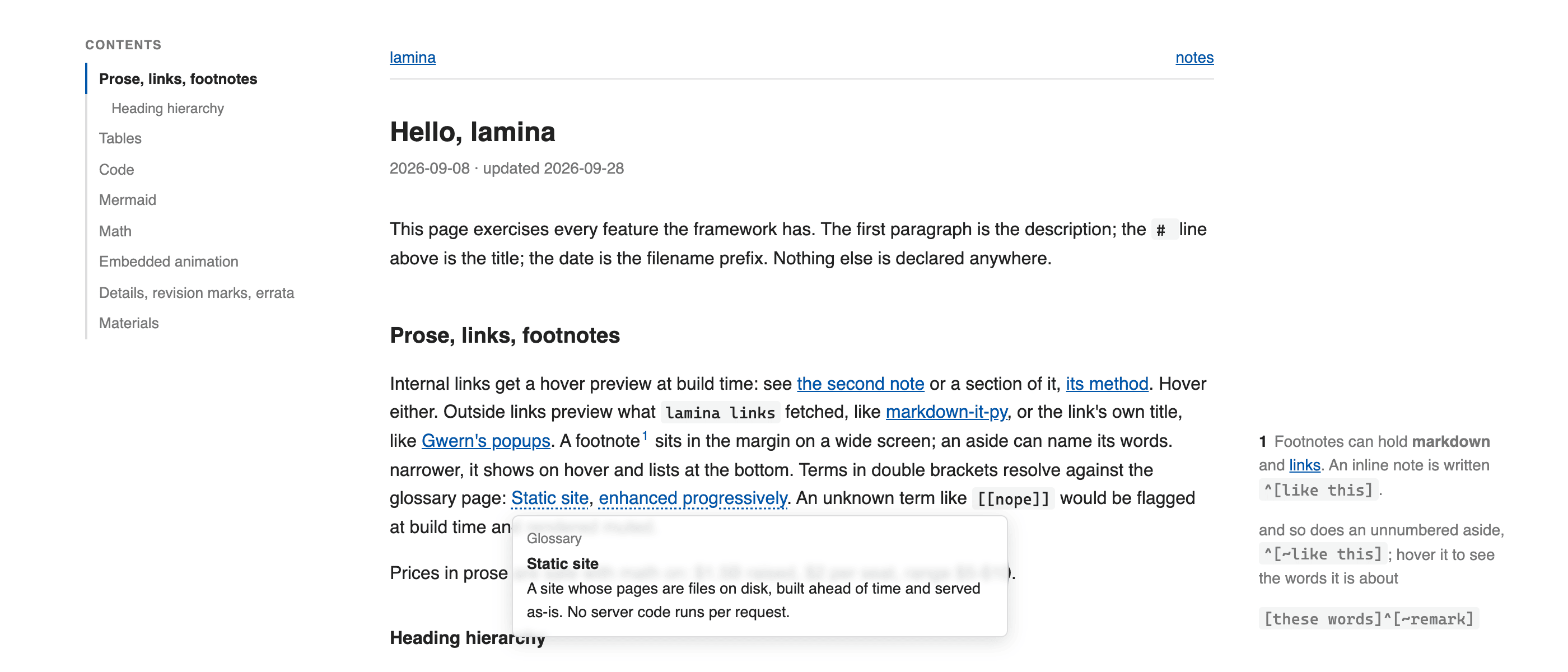
Internal links get a hover preview at build time: see the second note or a section of it, its method. Hover either. Outside links preview what lamina links fetched, like markdown-it-py, or the link's own title, like Gwern's popups. A footnote11 Footnotes can hold markdown, links, and math such as \(x^2\). An inline note is written ^[like this]. sits in the margin on a wide screenand so does an unnumbered aside, ^[~like this]; hover it to see the words it is about; an aside can name its words[these words]^[~remark]. narrower, it shows on hover and lists at the bottom. Terms in double brackets resolve against the glossary page: Static site, enhanced progressively. An unknown term like [[nope]] would be flagged at build time and rendered muted.
Prices in prose are safe with math on: $1.5B raised, $2 per seat, range $5-$10.
Code beside a price stays literal: $1.5B raised; write $x$ to show the syntax.
Heading hierarchy #
Third-level headings appear indented in the contents minimap without crowding it with deeper headings.
Use the # beside a heading to link directly to that section.
Tables #
GFM pipe tables. Headers sort ascending on the first click, descending on the next. Complete numbers compare numerically.
| project | stars | growth | note |
|---|---|---|---|
| alpha | 12.4K22 Counts are rounded; annotations do not affect sorting. | 8% | steady |
| beta | 980 | 31% | new |
| gamma | 1.2M | -2% | plateau |
Raw HTML tables wrapped in <div class="t"> still work exactly as before.
| value | meaning |
|---|---|
| 2026 roadmap | text label |
| $1,200 | currency |
| 8% | percentage |
| 12.4K | abbreviated number |
| 2026-10-01 | date, sorted as text |
| -2 | signed number |
| $-2 | negative currency |
| -$3 | negative currency, sign first |
| 12,34 | malformed grouping, sorted as text |
| concept | equation |
|---|---|
| Static output | \(x^2\) |
| Square root | \(\sqrt{x}\) |
Code #
The Copy button copies the code exactly, including indentation and newlines.
def hello(name: str) -> str:
    return f"hello, {name}"
indented code still works too
Mermaid #
flowchart LR
  md[pages/*.md] --> markdown-it-py --> lamina --> out[public/*.html]
  lamina -. previews, footnotes, ids .-> out
Rendered client-side by mermaid, theme follows the OS setting, source text is the no-JS fallback.
Math #
Inline: the loss is \(\mathcal{L} = -\sum_i y_i \log \hat{y}_i\) and the update is \(\theta \leftarrow \theta - \eta \nabla_\theta \mathcal{L}\).
Temml renders native MathML and loads only on pages that contain math. Without JavaScript, the TeX source stays visible.
Global macros work in the page and its footnote previews: \(x \in \RR\).33 The domain is \(\RR\).
Images #
Click the image to enlarge it, or focus it and press Enter. Choose Full size to inspect details. Close it with Escape, the Close button, or the backdrop.
Local images and audio/video sources are checked at build time, along with video posters.
Embedded animation #
A raw HTML block with its own script. Page assets live in a directory named like the page (2026-09-08-index/) and are served under /index/. The script uses lamina.onVisible to start only when scrolled into view, lamina.reducedMotion to respect the OS setting, and lamina.dark() for colours.
Inline <script> works the same way; a file is just easier to edit.
Details, revision marks, errata #
Materials #
Folded section (markdown inside works now)
Content with bold and a list:
- one
- two
Repeated headings keep distinct links
Same #
The first heading uses Same.
Same #
The repeated heading uses Same-2.
Same-2 #
This heading uses Same-2-2, avoiding the earlier generated name.
This paragraph was revised; the margin badge says when.
Struck text: old claim with GFM strikethrough, or <del> as before.
Errata
- 09-08 — nothing yet; this block shows the styling.